

On Rapaport Trade, selling begins the moment inventory is listed. The faster and more accurately stones are uploaded, the sooner they become visible to buyers across the marketplace.
For sellers managing dozens or hundreds of diamonds and gems, upload efficiency is not a minor detail. It affects how quickly inventory goes live, how reliably it is represented, and how easily pricing can be adjusted as market conditions change.
Once inventory is live, positioning, responsiveness, and presentation determine how effectively it competes.
Rapaport Trade includes tools designed to support this process from upload through sale. When used consistently, they help streamline operations and optimize selling opportunities.
Here are five worth incorporating into your workflow.
Key Takeaways
- Use the Right Upload Method for Your Workflow
- Diamond Ranking: Understand Your Position
- Adjust Pricing in Real Time
- Respond to Buy Requests
- Strengthen Listings With Complete Information and Media
1. Use the Right Upload Method for Your Workflow
How inventory is uploaded sets the foundation for everything that follows.
Rapaport Trade offers multiple upload options depending on certification type, volume, and internal systems.
Single Tab for Individual Stones
Use the Single tab when listing one stone at a time.
– GIA graded diamonds: Enter the GIA report number to automatically load certification data into the listing
– Other labs or uncertified stones: Complete the full form manually, including specifications, proportions, treatment details, lab information, and pricing fields
Complete and accurate data improves visibility in filtered searches and reduces follow up questions.
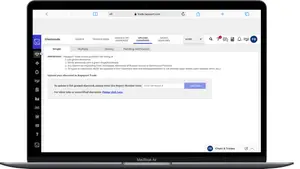
Multiple Tab for Bulk Upload
– Upload multiple stones at once using a CSV file based on Rapaport Trade’s template
– Structured fields ensure treatments and specifications are properly recorded
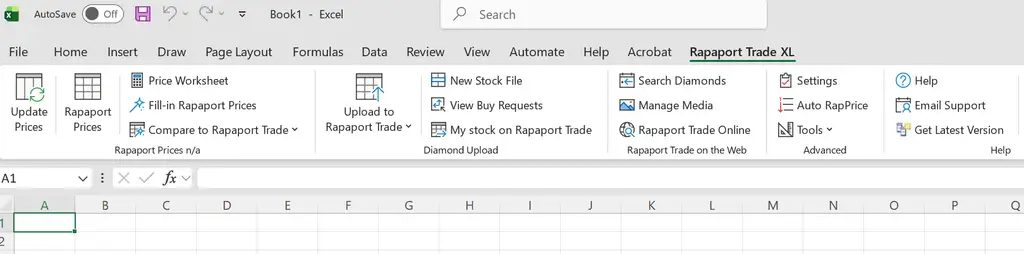
Rapaport Trade XL for Excel Based Workflows
For sellers managing inventory in Excel:
– Integrates live Rapaport Trade and Rapaport Price List data
– Calculate pricing based on percentages off Rap
– View Rapaport Trade best and average prices
– Upload and update listings directly from Excel
– Download inventory and BuyRequests
Rapaport Trade XL is included in the Dealer and Dealer Lite plans and available as a paid add on for other members.
API Integration for Larger Operations
Rapaport Trade also offers API integration with inventory management platforms.
– Automatically sync inventory
– Push updates in real time
– Reduce manual uploads
– Minimize pricing or availability discrepancies
Selecting the appropriate upload method improves efficiency and ensures listings are accurate from the start.
2. Diamond Ranking: Understand Your Position
Once inventory is live, positioning becomes critical.
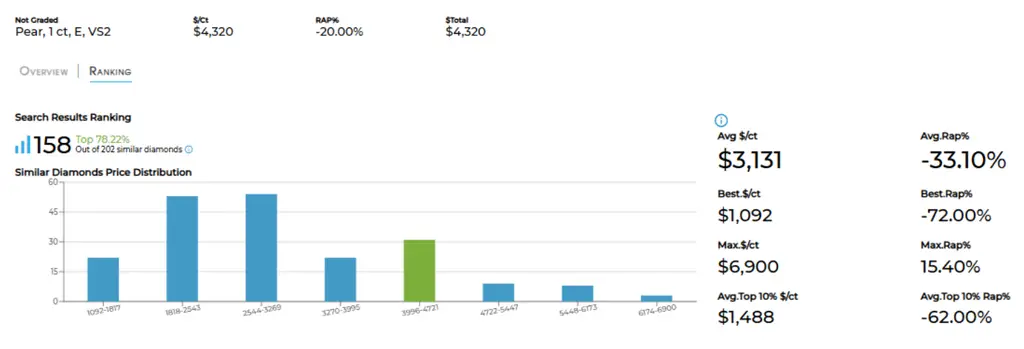
Available with the Dealer Plan, under Manage My Diamonds, click Overview Ranking to see how your stones are positioned within their category. This view allows sellers to evaluate where each listing stands relative to similar goods currently on the market.
Even small pricing differences can shift placement in search results, particularly in competitive segments where buyers compare multiple stones within narrow parameters.
Reviewing Overview Ranking regularly provides clarity on whether a listing is competitively positioned or requires adjustment.
3. Adjust Pricing in Real Time
Ranking provides insight. Pricing adjustments create movement.
Rapaport Trade allows sellers with the Dealer Plan to update pricing, live. If a stone is positioned above comparable goods, pricing can be revised immediately to improve placement in search results.
From within a category, you can:
– Click the magnifying glass to view competing stones
– Apply location filters to compare within your region
– Evaluate whether your discount aligns with similar listings
Rather than relying on static pricing, sellers can fine tune positioning based on live market conditions.
4. Respond to Buy Requests
While optimized listings improve visibility, responding to direct demand increases opportunity.
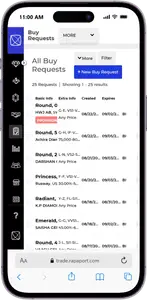
Buy Requests allow buyers to post specific sourcing needs. When a request matches your inventory, you are notified and can respond directly.
This shifts part of the sales process from passive discovery to active engagement. Instead of waiting to be found, you are responding to buyers who have already expressed intent.
In competitive categories, responsiveness can influence outcomes.
5. Strengthen Listings With Complete Information and Media
Even competitively priced stones can underperform if the listing lacks detail.
Buyers frequently apply detailed filters. If fields such as fluorescence intensity, measurements, origin, treatment, lab location, or laser inscription are left blank, your listing may not appear in filtered results.
Completing all relevant fields improves discoverability and reduces follow up questions.
Adding high quality photos and videos further supports engagement. Clear media allows buyers to assess cut quality, inclusions, color, and overall appearance before initiating contact, which can streamline communication and support faster decisions.
To Recap
Selling effectively on Rapaport Trade requires structured management from upload to pricing to presentation.
Choosing the right upload method improves efficiency from the start. Monitoring ranking clarifies market position. Real time pricing adjustments maintain competitiveness. BuyRequests connect you with active demand. Complete listings and strong media enhance visibility and engagement.
Used together, these tools help streamline workflow, improve positioning, and support stronger sell through in a global marketplace.